What you provide
Select the business location and one local search phrase in the GBP Rank AI application.
Check your Google Maps rankings across your service area. See where you're visible and where you have room to grow.A free heatmap checks Google Maps visibility point by point for one local keyword, then shows the pattern alongside the nearby businesses observed at the selected scan point.
The business lookup and scan run in the separate GBP Rank AI application. No credit card is required.
Business
Keyword
Top 5 nearby results
From search to evidence
The scan measures the same business from multiple coordinates so one city-wide average cannot hide where visibility changes.
Continue into the GBP Rank AI application and select the business location you want to scan.
The lookup happens in the application, not on this marketing page.
Select the local search term you want to measure for that business and service area.
Every scan is tied to a specific keyword.
Check Google Maps visibility from multiple points across the selected local market.
Each point records an observed position from that coordinate.
See where the business is visible, where it drops, and which local competitors appear around the selected point.
Use the result as a benchmark for future scans.
What to expect
The free heatmap is a focused observation of one business, one search phrase, and one local market; it is not a broad SEO audit or guaranteed ranking forecast.
Select the business location and one local search phrase in the GBP Rank AI application.
Observe that business's Google Maps position from multiple geographic grid points at scan time.
Review an on-screen heatmap showing stronger areas, visibility gaps, and nearby competitors for the selected phrase.
Use the result as a baseline, review the gaps, and optionally start a trial or run a future scan for comparison.
Compare the grid
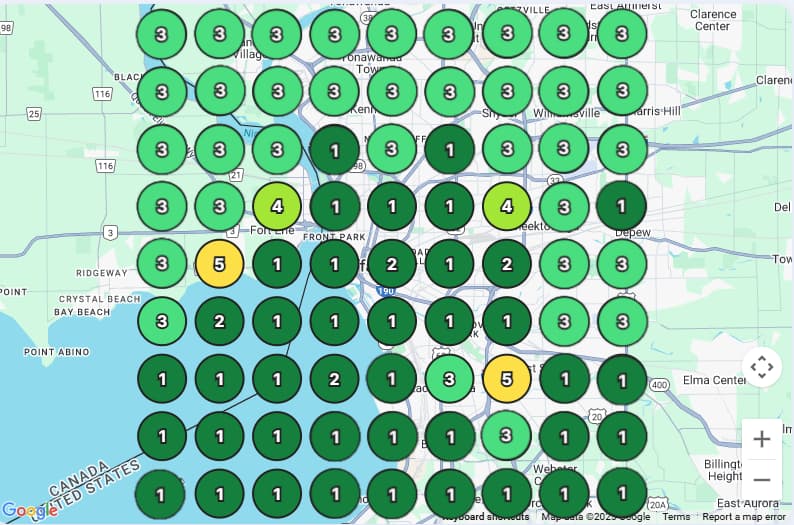
Drag or swipe the comparison to inspect two scans across the same geographic area. A later scan can be stronger, weaker, or mixed depending on the point.
Local Rank Heatmap
local service · selected market · example visibility comparison
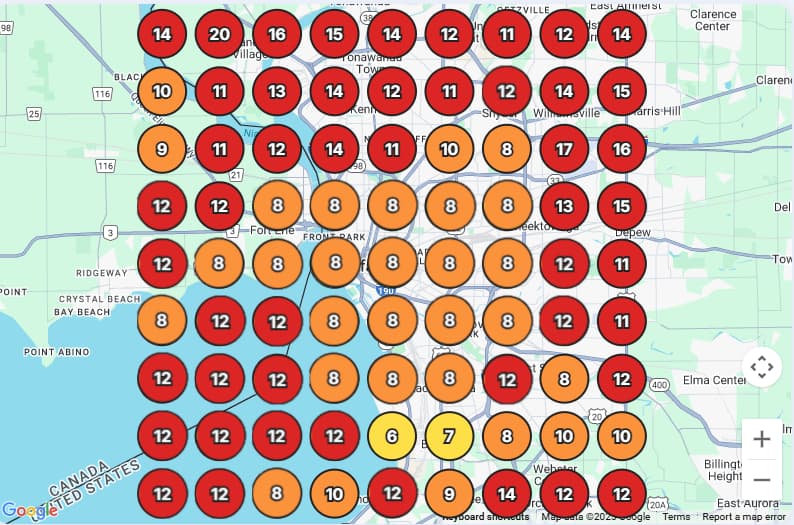 AfterBefore
Drag to compare
Comparing both
Example comparison. Each point is the rank observed at that search location.
What the heatmap reveals
The useful question is not only where the business ranks once. It is how that position changes throughout the market and who appears around it.
Top 5 nearby results
ExampleTop 3 coverage
6 of 9 points
Average rank
3.2
From evidence to action
The heatmap shows the local visibility pattern. The 30-day trial adds the broader profile, reviews, content, media, competitor, and reporting workflows around that evidence. No credit card is required.
Find the geographic ranking gap for the selected keyword.
Review categories, services, descriptions, and supported profile fields.
Keep posts, media, reviews, and feedback workflows moving.
Run future scans and review reports without treating one action as proof of causation.
Free heatmap FAQ
See the market clearly
Open the separate GBP Rank AI application, select the business and keyword, and run the free scan without a credit card.