See where you show up.Know your real Rankblock by block.
Check your Google Maps rankings across the neighborhoods your business serves.See how your Google Maps rankings change across your service area, keyword by keyword. Compare scans and share focused heatmap, competitor, audit, and activity reports.
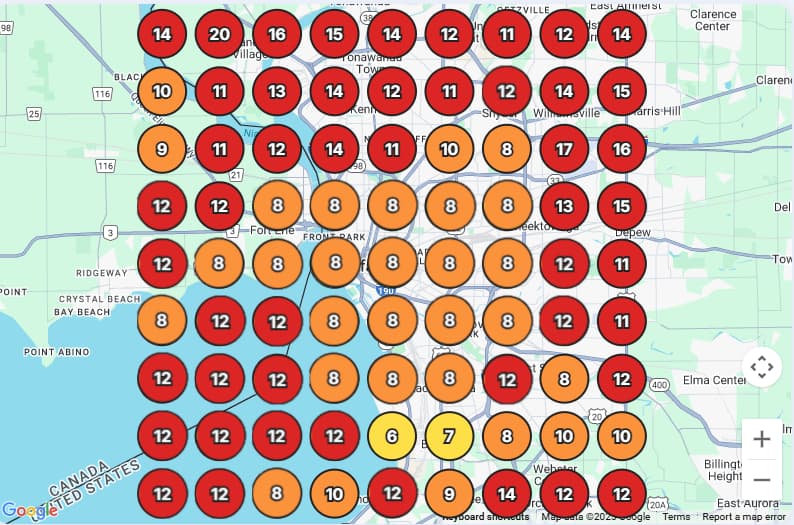
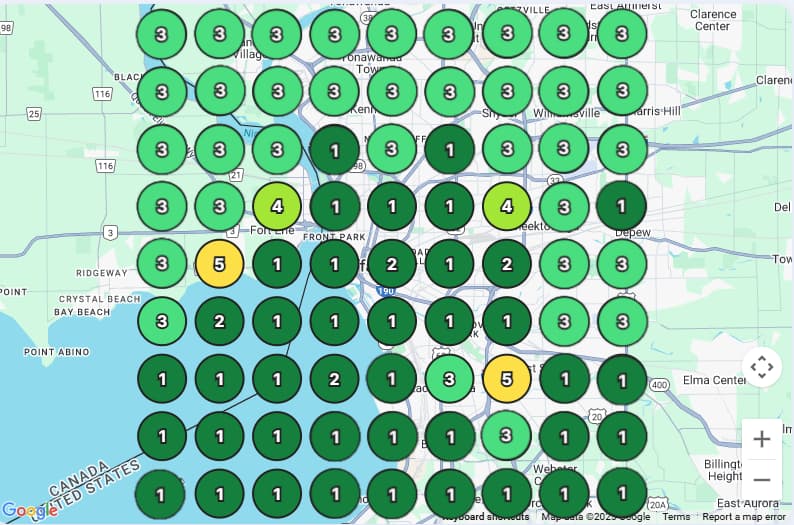
Local ranking heatmaps. Drag or tap the image, or focus the comparison and use the arrow, Home, End, Page Up, and Page Down keys.
Each pin shows where your business ranks on Google Maps at that spot. Compare scans to see where visibility improves or drops.
Why it matters
What heatmap rank tracking changes for the business.
See the task it handles, the controls available, and how completed activity stays visible.
A single average can hide strong and weak search zones only a few blocks apart.
Each keyword keeps its own location, market, grid, and scan settings so every comparison stays clear.
See which local competitors ranked above or below your business for the selected keyword at the time of the scan.
Workflow
A practical workflow for heatmap rank tracking.
Set the inputs, review the work, and keep the finished activity visible.
Configure the scan
Select the connected location, keyword, grid size, and storefront or service-area center that should anchor the search points.
Inspect every coordinate
Review numbered, color-coded ranking points, coverage differences, average position, and nearby service providers found during the scan.
Compare and report
Compare earlier and newer scans for the same market, create a map-based PDF, and reopen saved reports later.
Rank tracking and reports
The right evidence for every local SEO question.
Keep geographic rankings, market research, profile quality, and completed work clear. Each report has its own inputs, calculations, and export.
Heatmap scans and PDFs
Measure one keyword across your service area, compare scans, and share the ranking evidence.
Location, keyword, grid size, and storefront or service-area center
Numbered ranking pins, strong and weak coverage, and average observed rank
Earlier and current scans, heatmap image, and providers ranked above or below you
Local recommendations, downloadable PDFs, and saved scan and report history
Competitor Intelligence PDFs
Research a category or service separately from the competitors observed in a heatmap scan.
Analyzed business and address, selected category or service
Filtered nearby businesses, addresses, and geographic placement
Duplicate cleanup, service relevance, and associated keywords
Separate search history, saved competitor reports, and PDF downloads
GBP Audit PDFs
Inspect six profile checks and save a focused improvement checklist.
Primary category, hours, phone, and website checks
Photo count and review-response activity
Score out of 60, calculated percentage, and passed or failed checks
Generated date, prioritized checklist, and print or save as PDF
Activity Report PDFs
Document completed work for the selected location and date range.
Check-in photos, published Google posts, and reviews receiving owner responses
All, Photos, Reviews, or Posts section selection
Explicit location and date-range filtering
Activity-only PDF; heatmap, competitor, and audit reports stay separate
FAQ
Common questions about heatmap rank tracking.
How is the heatmap different from the rank number in other tools?
A heatmap shows observed positions at many points across the selected service area. It can reveal that the business appears strongly near one part of the market and drops farther away, while the average remains only a supporting summary.
Can I track more than one keyword?
Yes. Core services, nearby-intent searches, and city or neighborhood phrases can each use their own scan so the keyword-specific geography remains clear.
What competitor information is included?
A heatmap scan shows nearby service providers found for the selected keyword, including which providers ranked above or below your business, their observed positions, and their addresses. The separate Competitor Intelligence workflow provides broader category or service research.
Does a scan comparison prove what caused a ranking change?
No. Proximity, competition, profile quality, market conditions, and other Google signals can affect results. The comparison shows how observed positions changed over time without assigning the change to one action.
Is there one PDF containing every report type?
No. Heatmap, Competitor Intelligence, GBP Audit, and Activity reports are separate systems. The Activity PDF can combine photos, posts, and responded reviews, but it does not include heatmaps, competitor intelligence, or the GBP Audit.
Can I reopen previous heatmap reports?
Yes. Save a PDF for the selected location, keyword, and geographic scan, then reopen previous heatmap reports from history. Competitor research has its own saved reports and download access.
Related capabilities
Connect heatmap rank tracking with the rest of the platform.